Logoimage editor ai
  • Pricing
  • Faq
Logoimage editor ai

Free Online Image Editor AI

Just describe what you want — remove objects, swap backgrounds, retouch portraits, and enhance product images. Watermark-free, HD, private. Upload your photo below and start editing.
5 Free Credits Every Day You Log InNo Watermark · No Ads · HD DownloadJPG, PNG, WEBP · Private & Secure

Send up to 10 images as reference for your edit.

Be specific about what to change and what to keep — clear prompts produce better results.
AI image editor preview 1

Start faster with ready-to-use editing prompts

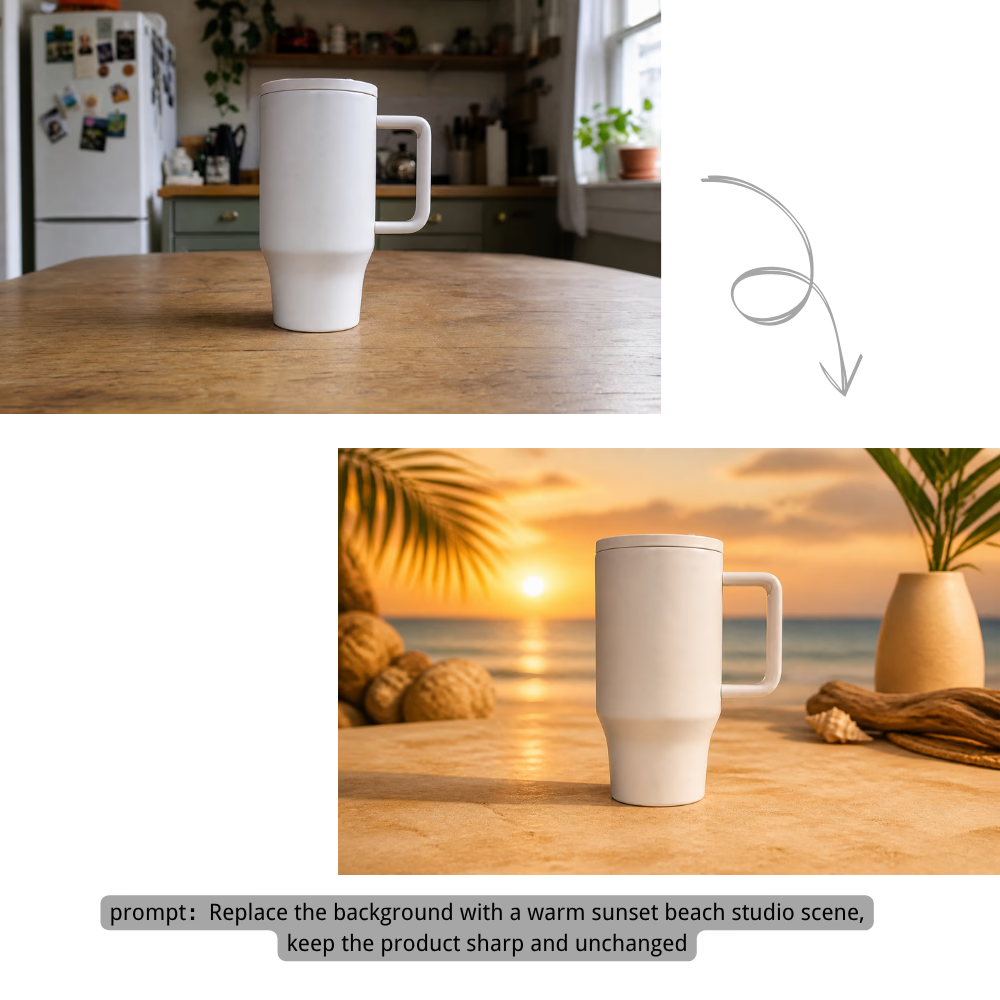
Choose one representative prompt from each Image Editor AI category. The prompt sits directly on the image, and the hover action sends it to the editor above.

Remove or replace image backgrounds for product photos, portraits, and creative shots.

Background

Replace the background with a warm sunset beach studio scene, keep the product sharp and unchanged

Transform any photo into anime, oil painting, watercolor, or cinematic styles.

Style Transfer

Transform this portrait into a cinematic watercolor anime artwork with luminous city lights

Erase unwanted objects, people, watermarks, or add new elements naturally.

Object Editing

Remove the unwanted object from the room and rebuild the floor and light naturally

Retouch portraits — smooth skin, change hair, brighten eyes, and add expressions.

Portrait

Retouch the portrait naturally: smooth minor blemishes, brighten eyes, and keep real skin texture

Upscale, sharpen, fix lighting, reduce noise, and restore old photo details.

Quality

Restore this old photo, remove scratches, sharpen details, and recover natural colors

What you can do with Image Editor AI

Describe what you want to change in plain English. Image Editor AI handles background replacement, object erasing, photo restoration, style transfer, upscaling, portrait retouching, and in-image text editing — all from a single prompt input.

Remove & Replace Backgrounds

Erase messy, distracting, or cluttered backgrounds and replace them with clean studio backdrops, lifestyle scenes, seasonal themes, or brand-aligned environments. Perfect for pet photos, products, portraits, and social media visuals.

Remove & Replace Backgrounds

Erase Unwanted Objects

Remove people, watermarks, text, trash cans, power lines, and any distracting elements from your photos. The AI fills the erased area naturally so the result looks clean and untouched — no cloning or healing tools needed.

Erase Unwanted Objects

Restore Old Photos

Bring faded, scratched, and damaged photos back to life. Fix colors, remove noise and grain, repair tears and creases, and enhance faded details. One-click restoration that would take hours with traditional editing tools.

Restore Old Photos

Apply Artistic Styles

Transform any photo into an anime scene, oil painting, watercolor illustration, cinematic still, pencil sketch, or pixel art. Experiment with different artistic directions without starting from scratch or learning complex filters.

Apply Artistic Styles

Enhance & Upscale Quality

Sharpen soft images, fix poor lighting, reduce noise, and upscale to 4K resolution. Turn low-quality phone snapshots and compressed web images into crisp, print-ready visuals suitable for any platform or format.

Enhance & Upscale Quality

Portrait & Pet Retouching

Remove blemishes, smooth skin naturally, brighten eyes, whiten teeth, clean tear stains, tidy fur, and improve lighting — all while keeping portraits realistic. Get polished results without a photographer or retoucher.

Portrait & Pet Retouching

Edit Text in Product Posters

Change words inside posters, ads, packaging mockups, social graphics, and product visuals while keeping the original layout, colors, photo, and brand style intact. Translate English copy to Chinese or update campaign wording in seconds.

Edit Text in Product Posters

How to edit an image with Image Editor AI — 3 simple steps

No downloads, no design skills, no complicated tools. Just upload to Image Editor AI, describe, and download.

1

Upload Your Image

Drag and drop your photo into the editor. Supports JPG, PNG, and WEBP up to 24MB. Works directly in your browser — no software to install.

2

Describe Your Edit

Tell Image Editor AI what you want to change using a simple text prompt. Try one of our prompt templates or write your own. The more specific your description, the better the result.

3

Download Your Result

Preview the edited image, compare with the original using the before/after slider, and download in high resolution. Watermark-free — your edit is ready to use.

Pricing

Choose monthly credits for image editor ai edits, background changes, object removal, image enhancement, and prompt-guided image generation.

Save 30%

Basic

$15.9/month

For getting started with AI image editing


  • 600 credits included every month
  • Up to 120 standard image edits each month
  • Edit images with prompts, cleanup, and background changes
  • Ideal for product photos, social posts, and quick retouching
  • Full commercial use rights included
  • 24/7 customer support
  • Watermark-free image exports
    Popular

    Pro

    $29.9/month

    For creators who need more output and faster iteration


    • 1,500 credits included every month
    • Up to 300 standard image edits each month
    • Edit images with prompts, cleanup, and background changes
    • Ideal for ecommerce, ads, and frequent creative iteration
    • Full commercial use rights included
    • 24/7 customer support
    • Watermark-free image exports

      Max

      $69.9/month

      For teams and power users with high-volume production


      • 4,000 credits included every month
      • Up to 800 standard image edits each month
      • Edit images with prompts, cleanup, and background changes
      • Built for batch product images, campaigns, and team workflows
      • Full commercial use rights included
      • 24/7 customer support
      • Watermark-free image exports
        Top up

        Need more credits?

        One-time purchase. Add credits anytime — works alongside any plan.

        Best value
        $9.9300credits
        Valid for 30 days300 credits for about 60 standard image edits, valid for 30 daysOther benefits match subscription plans, except for the credit amount

        Image Editor AI for everyday and professional work

        From ecommerce product shots to family photo restoration — see how different people use Image Editor AI to get publish-ready visuals faster.

        E-commerce

        Amazon, Shopify, and Etsy sellers use Image Editor AI to remove backgrounds from product photos, create consistent storefront visuals, and generate clean white-backdrop product shots in under 30 seconds — no Photoshop required.

        Social Media

        Instagram, TikTok, and YouTube creators rely on Image Editor AI to produce cover images, thumbnails, profile pictures, and campaign visuals. Switch between multiple styles with one prompt — 10× faster than manual editing.

        Old Photo Restoration

        Families and memory keepers restore faded, scratched, and damaged photos in one click. What used to require expensive professional restoration services is now free and instant with AI-powered repair and colorization.

        Marketing & Ads

        Marketing teams and small business owners create ad creatives, banners, and landing page visuals directly in the browser. Skip the designer queue — generate on-brand assets whenever you need them.

        Portrait & Headshots

        Job seekers, freelancers, and professionals improve selfie quality and create polished headshots. Natural retouching — blemish removal, eye brightening, skin smoothing — happens in seconds with no retouching skills needed.

        Creative Design

        Designers and art students rapidly explore different styles, color schemes, and visual directions. Zero-cost creative exploration — iterate through unlimited variations before committing to a final direction.

        A fast, free online Image Editor AI built for clean results

        We focused on what matters most: no barriers to entry, no clutter in your results, and no surprises. Here's what makes Image Editor AI different.

        Free Tier

        100% Free, No Watermark, No Ads

        Use Image Editor AI free of charge — every image you download is watermark-free, even on the free tier, and you won't see a single ad while you work. No hidden charges, no upsells.

        50+ Templates

        Prompt Templates Library

        Browse 50+ categorized prompt templates organized by editing task. Can't think of the right prompt? Click any template to fill the input box instantly — designed for first-time users and power editors alike.

        Interactive

        Built-in Before/After Slider

        Compare your original and edited image side by side with an interactive slider. No need to download first to check the difference — inspect every detail directly in the browser before exporting.

        Secure

        Privacy First

        All uploads are protected with end-to-end encryption during transfer and processing. Images are automatically deleted from our servers after processing is complete. We never store, share, sell, or use your photos for AI training.

        Up to 4K

        High-Resolution Export

        Download edited images in crisp high resolution — up to 4K. Suitable for printing, ecommerce listings, marketing materials, and any platform that demands quality output. No compression artifacts, no quality loss.

        Any Device

        Works on Desktop & Mobile

        Open your browser, visit the page, and start editing. Works on Windows, Mac, iPhone, Android, and tablets. No app to download, no plugin to install — fully browser-based with a responsive interface optimized for any screen.

        How to get better editing results

        A great edit starts with a great prompt. Follow these simple guidelines to get consistently better results from Image Editor AI.

        4 Tips for Better Editing Prompts

        • Be specific: Instead of "make it better," try "sharpen the image, increase contrast, and brighten the shadows." The AI needs clear direction — vague prompts produce vague results.
        • Describe what to keep: When changing backgrounds or objects, explicitly mention what should stay unchanged. For example: "Change the background to a sunset beach, but keep the person and clothing exactly as they are."
        • Start from a template: Browse the Prompt Templates Gallery above, pick the closest match to your goal, and customize it. Templates are designed to produce reliable results for common editing tasks.
        • Iterate and refine: If the first result isn't perfect, tweak your prompt and regenerate. Try adjusting adjectives, adding more detail, or breaking a complex edit into smaller steps. It's free to try again.

        Common Prompt Problems & Fixes

        Problem
        Fix
        "make it better"
        "sharpen the image, increase contrast, and brighten the shadows"
        "change the background"
        "change the background to a sunny beach at sunset, keep the person and clothing unchanged"
        "remove the object"
        "remove the coffee cup on the table, keep the laptop, books, and desk lamp"
        "make it look artistic"
        "turn this photo into a Van Gogh oil painting style with bold brushstrokes and vibrant colors"

        Frequently Asked Questions

        What is Image Editor AI?+
        Image Editor AI is a free online tool that lets you edit photos using artificial intelligence. Instead of manually adjusting pixels with complex software like Photoshop, you simply upload an image and describe what you want to change in plain English — like "remove the background" or "turn this into a watercolor painting." Image Editor AI understands your prompt and applies the edit automatically, preserving the parts of the image you want to keep.
        Is Image Editor AI really free?+
        Yes. You can use Image Editor AI for free with no hidden charges. We offer a generous free tier that covers all core features — background removal, object erasing, photo restoration, style transfer, and portrait retouching. For higher usage volume, faster processing, and advanced features like 4K export, we offer affordable Pro plans. All free-tier features are clearly labeled so you know exactly what you're getting.
        Do I need to install anything to use Image Editor AI?+
        No installation needed. Image Editor AI runs entirely in your browser — Chrome, Safari, Firefox, Edge — on both desktop and mobile. Open the page, upload a photo, and start editing. No downloads, no plugins, no browser extensions, no app store.
        Will there be a watermark on my edited photos?+
        No. All images edited with Image Editor AI are watermark-free — on both free and paid tiers. We believe you should own your edits completely, with no branding, no logos, and no restrictions on how you use the output.
        What file formats are supported?+
        We support JPG, PNG, and WEBP formats for upload, with a maximum file size of 24MB per image. Edited images can be downloaded in JPG, PNG, or WEBP. For best results, upload clear, well-lit photos in the highest resolution available.
        Can I use the edited images for commercial purposes?+
        Yes. Images you edit with our tool can be used for commercial projects including e-commerce product listings, social media ads, marketing materials, branding, packaging, and print. You own the results and can use them however you need — no attribution required.
        Is my data safe and private?+
        Yes. Your uploaded images are protected with end-to-end encryption during transfer and processing. All images are automatically deleted from our servers after processing is complete. We do not store, share, sell, or use your photos for AI training or any other purpose. Your images are yours alone.
        How fast is the editing process?+
        Most edits complete in 5–30 seconds. Simple edits like background removal typically take under 10 seconds. Complex transformations like style transfer or 4K upscaling may take 30–60 seconds depending on the model and resolution selected. Processing time is shown in real-time so you always know what to expect.
        What editing tasks can I do with Image Editor AI?+
        With Image Editor AI you can: remove or replace backgrounds, erase unwanted objects or people, restore old or damaged photos, apply artistic styles (anime, oil painting, watercolor, cinematic), retouch portraits naturally, upscale images to 4K, change hair colors, edit text within images, and combine elements from multiple images — all by describing what you want in plain English. No manual selection tools or layer masks needed.
        How do I get the best results from Image Editor AI?+
        Be specific in your prompt. Instead of "make it better," try "sharpen the image, increase contrast, and brighten the shadows." Use our prompt templates as starting points — they are designed to produce reliable results for Image Editor AI. Upload clear, well-lit photos for the best output quality. If the first result isn't perfect, tweak your prompt and regenerate — it's free to try again.

        Ready to edit photos with Image Editor AI?

        Upload a photo, describe your edit, and download a professional-quality result in seconds. No watermark, no ads — just fast, free Image Editor AI.

        Upload & Edit Free

        About Image Editor AI

        Image Editor AI is a free online photo editing tool that lets you edit images by describing changes in plain English. Upload a photo, type a prompt, and Image Editor AI handles the rest — remove backgrounds, erase unwanted objects, restore old photos, apply artistic styles, retouch portraits, enhance quality, and upscale to 4K. Image Editor AI is built for ecommerce sellers who need clean product photos, social media creators producing daily content, marketers iterating on ad creatives, families restoring faded memories, and professionals polishing headshots — all without downloading software or dealing with watermarks. The tool supports JPG, PNG, and WEBP formats up to 24MB, processes most edits in under 30 seconds, and automatically deletes uploaded images after processing. With a library of 50+ categorized prompt templates, an interactive before/after comparison slider, and end-to-end encrypted uploads, Image Editor AI is designed to be the simplest free online photo editor for getting professional-quality edits directly in your browser.

        Logoimage editor ai

        AI image editing tools for cleaner, publish-ready visuals.

        Email
        Company
        Legal
        © 2026 image editor ai All Rights Reserved.[email protected]We are not affiliated with the model providers. All trademarks belong to their respective owners.
        About
        Contact
        Cookie Policy
        Privacy Policy
        Acceptable Use Policy
        Terms of Service

        Basic

        For getting started with AI image editing

        600 credits

        • 600 credits included every month
        • Up to 120 standard image edits each month
        • Edit images with prompts, cleanup, and background changes
        • Ideal for product photos, social posts, and quick retouching
        • Full commercial use rights included
        • 24/7 customer support
        • Watermark-free image exports

        Pro

        For creators who need more output and faster iteration

        1,500 credits

        • 1,500 credits included every month
        • Up to 300 standard image edits each month
        • Edit images with prompts, cleanup, and background changes
        • Ideal for ecommerce, ads, and frequent creative iteration
        • Full commercial use rights included
        • 24/7 customer support
        • Watermark-free image exports

        Max

        For teams and power users with high-volume production

        4,000 credits

        • 4,000 credits included every month
        • Up to 800 standard image edits each month
        • Edit images with prompts, cleanup, and background changes
        • Built for batch product images, campaigns, and team workflows
        • Full commercial use rights included
        • 24/7 customer support
        • Watermark-free image exports

        Need more credits?

        One-time purchase. Add credits anytime — works alongside any plan.

        300-credit pack

        300 credits

        300 credits for about 60 standard image edits, valid for 30 days

        Valid for 30 days